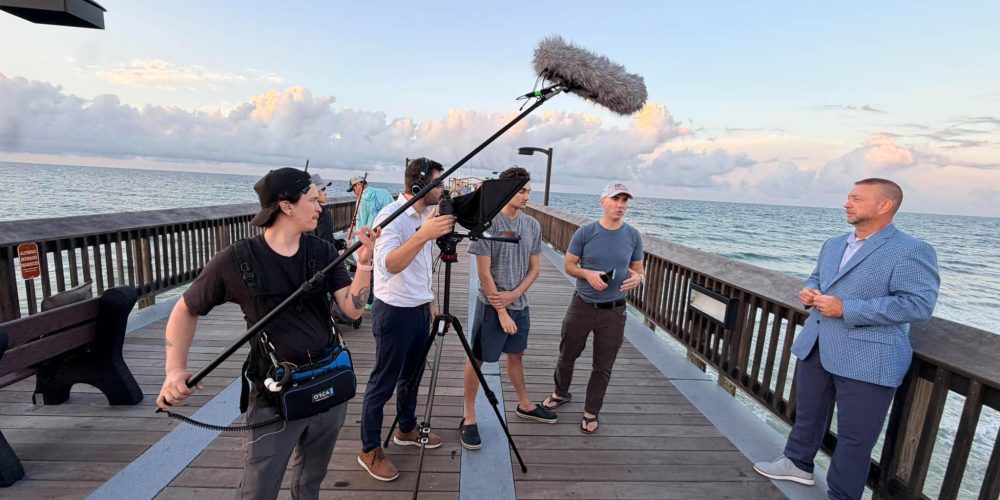
Viewers will forgive shaky handheld footage far more readily than they will forgive muffled, echoey, or noise-riddled dialogue. Audio is arguably the most important part of your video — people will tolerate imperfect visuals but not poor sound. Yet on most small-to-mid-size shoots, audio is also the most under-resourced department. This guide walks you through a practical, stage-by-stage system for capturing and delivering clean audio when filming video, from pre-production decisions all the way through the post-production chain.
Why Audio Quality Matters More Than You Think
The human ear detects acoustic flaws — hiss, room echo, wind rumble — almost immediately, and once a viewer notices a problem with the sound, trust in the production value collapses. Clean audio signals professionalism. For corporate videos, brand films, or any content produced for Tone Production-level clients, it is non-negotiable. If you have any budget left after camera and lighting, prioritize audio gear — quality sound makes the production value of your videos skyrocket in ways that a better lens simply cannot.
Stage 1 — Pre-Production: Scout for Sound, Not Just Vision
Most audio problems are created before the camera rolls. Location scouting should include an acoustic assessment, not just a visual one.
Listen Before You Shoot
- Visit at shoot time. A location that is quiet at 9 a.m. can be under a flight path at 2 p.m. Listen during the same hour you plan to film.
- Identify mechanical noise sources. HVAC systems, refrigerators, server rooms, and aquariums all produce a constant low-frequency hum that becomes a nightmare in post. Turn off or unplug everything you can before rolling.
- Assess the room’s reverb. Large, hard-surfaced rooms — tile, glass, concrete — create echo that is nearly impossible to remove in post without damaging the dialogue. Rooms with carpet, soft furnishings, and acoustic panels are far more forgiving.
- Plan for outdoor variables. Wind, traffic, and ambient crowd noise are unpredictable. Always build contingency time into outdoor schedules.
Treating the Space on the Day
You do not need a purpose-built studio to get a dry, clean sound. Hanging moving blankets on reflective walls, placing rugs on hard floors, and positioning the talent away from windows dramatically reduces room tone. Avoid large, reflective rooms where possible; if you can’t, use blankets and furniture to deaden the space before you press record.
Stage 2 — Microphone Selection: Right Tool, Right Situation

No single microphone is best for every scenario. Understanding the three most practical options for video work lets you make smart choices on every shoot.
Lavalier (Lapel) Microphones
The lavalier is the easiest path to clean, close-up audio for interviews and on-camera dialogue. Because it clips to the talent’s clothing — typically at the upper chest or lapel — it maintains a consistent distance from the mouth regardless of head movement. A wireless lavalier is particularly useful because it eliminates the cable management problem and works equally well indoors and outdoors. If you are just starting to build a kit, a quality wireless lav is the single highest-ROI audio investment you can make.
One practical tip: if clothing rustle is an issue, thread the cable under the garment and secure the capsule with medical tape against skin or a fabric layer closer to the body. This reduces friction noise significantly.
Shotgun Microphones
A shotgun mic uses a very narrow pickup pattern to reject off-axis sound, making it ideal for situations where a lavalier is impractical — documentary-style shooting, moving subjects, or scenes with multiple people. The narrow pickup pattern reduces ambient noise by rejecting sounds that are not directly in front of the mic. The critical rule: a shotgun must be placed as close to the speaker as the frame allows, typically on a boom pole operated just above or below the frame line. Distance is the enemy — every foot you add between mic and mouth increases the ratio of room noise to direct signal.
When to Use Both
On interview-heavy productions, running both a boom and a lav gives you a safety net. The lav provides a clean, intimate track while the boom captures natural room presence. In the edit you can blend them or simply use whichever track is cleaner on any given line.
Stage 3 — Setting Recording Levels Correctly
Even a great microphone in a treated room will deliver unusable audio if the recording levels are wrong. This is one of the most common — and most avoidable — mistakes in video production.
Target a Healthy Input Level
- Aim for peaks around −12 dBFS to −6 dBFS on a camera or field recorder. This gives you headroom for unexpected volume spikes without clipping.
- Never let the meter hit 0 dBFS. Digital clipping — the distortion caused by an overloaded input — cannot be repaired in post. It is permanent.
- Do not record too quietly either. A signal recorded at −30 dBFS or lower will require heavy gain in post, which amplifies noise along with the dialogue.
Always Monitor with Headphones
Monitoring in real time is how you catch problems while you can still fix them. Use closed-back headphones — not earbuds — so you hear what is actually being recorded rather than the ambient room sound around you. Check your audio levels regularly throughout the shoot to ensure you are not clipping or drifting. An audio issue you hear on set takes thirty seconds to fix; the same issue found in the edit suite can cost hours.
Record a Separate Room Tone Track
At the end of each new location, record 30–60 seconds of “room tone” with everyone silent. This ambient recording is invaluable in post for filling gaps, smoothing edits, and giving your sound designer a clean noise profile to work with during noise reduction.
Stage 4 — Outdoor and Field Recording Challenges
Outdoor shoots introduce variables that no amount of room treatment can solve. Wind is the most destructive force for a microphone diaphragm.
- Use a windscreen or “dead cat” on any outdoor mic. A foam windscreen reduces light wind; a furry windshield (dead cat) is necessary for anything above a gentle breeze. For outdoor recording, windshields are not optional accessories — they are essential.
- Position talent to face away from wind and traffic. Even a slight change in orientation can reduce wind blast and street noise significantly.
- Use a portable field recorder as a backup. Running a dedicated recorder like a Zoom H-series or a Sound Devices MixPre alongside your camera gives you a safety track and eliminates camera-preamp noise.
- Record each audio source on separate tracks where possible. Separate tracks give you maximum flexibility in the edit and allow for precise, isolated adjustments without affecting other elements of the mix.
Stage 5 — Post-Production Audio Cleanup

Even a well-recorded track often needs polish in post. A disciplined cleanup workflow separates a final mix that sounds broadcast-ready from one that sounds “good enough.”
Noise Reduction
Dedicate noise reduction tools — built into Adobe Audition, DaVinci Resolve’s Fairlight, and iZotope RX — work by analyzing a section of room tone, building a noise profile, and subtracting that profile from the full track. Apply noise reduction subtly; over-processing creates a robotic, artifact-laden sound that is often worse than the original noise.
EQ and Compression
A high-pass filter set between 80–120 Hz rolls off low-frequency rumble — traffic, HVAC, footsteps — without touching the voice frequencies. A gentle compressor then evens out volume inconsistencies between a soft-spoken answer and a loud laugh, maintaining a consistent listening level throughout.
AI-Powered Tools
AI audio cleanup has matured significantly. Adobe Podcast Enhance Speech is a free online tool that can dramatically improve dialogue clarity by isolating the voice and suppressing background noise. It accepts files up to 30 minutes and processes up to one hour of audio per day on the free tier. These tools work best on tracks that were reasonably well-recorded to begin with; AI cleanup is a polish step, not a rescue operation for fundamentally broken audio.
Export Settings That Preserve Your Work
After all that effort, do not let poor export settings undo it. Export audio in a lossless format (WAV or AIFF) whenever the deliverable workflow allows, set the sample rate to 48,000 Hz (the video standard), and use stereo at 320 kbps for compressed deliverables. Low export settings can undo all the hard work you put into making your audio sound clean and crisp.
A Quick Pre-Roll Audio Checklist
- HVAC, fans, and appliances turned off or unplugged
- Room treated with soft surfaces where possible
- Correct mic selected and positioned correctly for the situation
- Input levels peaking between −12 dBFS and −6 dBFS
- Closed-back headphones connected and monitoring live
- Windscreen or dead cat on any outdoor microphone
- Room tone recorded at every new location
- Backup field recorder rolling on a separate track
Professional video production teams that work across multiple markets — from New Orleans and Houston to Atlanta and Tampa — face wildly different acoustic environments on every shoot. The ability to adapt mic selection, placement strategy, and room treatment to each location is a core skill that separates consistently professional-sounding work from inconsistent results.
If this process sounds like a lot to manage on top of directing, operating a camera, and keeping a shoot on schedule, that is because it genuinely is. Audio is a dedicated craft. When it matters — a brand film, a product launch, a corporate documentary — bringing in a team that handles it properly from the first location scout to the final mix is the most reliable way to protect the investment you are making in the production. Tone Production, led by Benjamin Tone, builds dedicated audio workflows into every engagement. If you would rather hand off the sound — and everything else — to an experienced team, reach out and we will take care of it.
Frequently Asked Questions
What is the most common reason video audio sounds bad?
The single most common cause is using a camera’s built-in microphone. On-camera mics pick up handling noise, camera motor noise, and every sound in the room equally. Switching to an external lavalier or shotgun microphone — positioned close to the subject — eliminates most of these problems at the source.
How close should a microphone be to the speaker for clean audio?
For a boom-mounted shotgun mic, aim to keep it within two to three feet of the subject, just outside the camera frame. For a lavalier, the capsule should sit roughly six to eight inches below the chin. The closer the mic is to the sound source, the better the signal-to-noise ratio.
Can you fix bad audio in post-production?
You can improve it, but you cannot fully fix fundamentally broken audio. Tools like iZotope RX, Adobe Audition’s noise reduction, and Adobe Podcast Enhance Speech can reduce steady background noise and even out levels effectively. However, hard digital clipping, severe wind distortion, and echo-heavy recordings rarely recover to broadcast quality. The goal is always to record clean at the source and use post as a polish step.
What is room tone and why do I need it?
Room tone is a 30–60-second recording of the ambient sound in a location with everyone silent. Every room has a unique sonic fingerprint — a low hum, a faint HVAC whirr, distant traffic. Recording room tone gives your editor and sound designer a clean audio sample to fill gaps between dialogue lines and to build a noise profile for noise-reduction processing.
Should I use a lav mic or a shotgun mic for interviews?
Both are valid, and using both together is the professional standard. A lavalier gives you a consistent, intimate track regardless of head movement. A boom-mounted shotgun provides a more natural-sounding track with the room’s acoustic character. Running both and choosing the better track — or blending them — in the edit gives you maximum flexibility and a built-in safety net.
What recording level should I target on my camera or recorder?
Target peaks between −12 dBFS and −6 dBFS. This range is loud enough to sit well above the noise floor but leaves sufficient headroom to prevent digital clipping if the talent raises their voice unexpectedly. Never allow the meters to hit 0 dBFS — digital clipping is permanent and cannot be repaired.
Do I really need headphones on set?
Yes. Monitoring through closed-back headphones is the only way to hear exactly what the microphone is capturing in real time. Room acoustics, clothing rustle, handling noise, and wireless interference are all detectable through headphones before the take is over — when you can still fix the problem. Discovering these issues in the edit suite costs far more time and money.
New Orleans Videographers: 6 Go-To Crews for Brand Video in 2026
Best Gimbals and Stabilizers for Run-and-Gun Shooting
Scottsdale Videographers: 6 Reliable Crews for Cinematic Brand Video